
1. Abstract
Rules applied to an Entity are widely used in Board to support aggregation logic within reporting structures. A common example is a P&L Reporting Line entity, where rules allow users to calculate and aggregate specific reporting categories.
When working with such rules, it is critical to understand how entity sorting impacts both the display of members and the results of rule calculations.
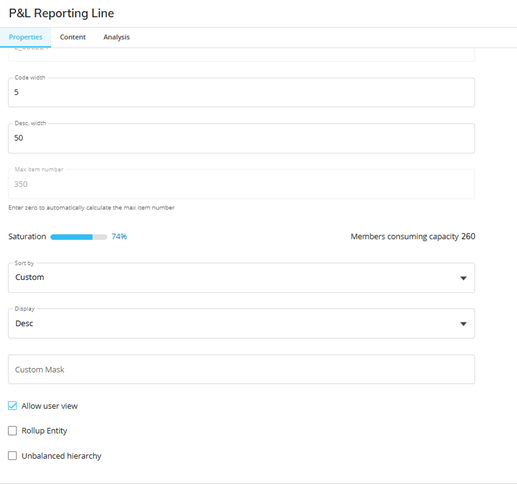
Although entity members may be loaded in one order, a SORT setting can reorder them, creating discrepancies between the underlying member sequence and the visible order. This can affect:
- How members appear to the user
- Which members are included in rule-based operations
- How data moves between cubes during procedures, especially via Dataflows
In particular, rules that use a SUM range (e.g., SUM([Member1]:[MemberN])) can produce inconsistent results when sorting differs across models or cubes.
2. Context
Assume we have a P&L report based on a cube where a rule is used to calculate aggregated results. We now want to create a dashboard that uses a new set of dashboard cubes, and the rule logic needs to work identically in this new environment.
If the original rule relies on positional logic—such as SUM ranges—the calculations in the dashboard cubes may differ from those in the original report due to differences in entity sorting or cube structures.
3. Content
To ensure rule evaluations behave consistently when data flows from one cube to another (e.g., Reporting → Dashboard), rules should be constructed using explicit, member-by-member aggregation rather than SUM ranges.
Example (Avoid):
SUM([Member1]:[MemberN])→ This depends on the entity's internal order, which may be modified by SORT settings.

Example (Recommended):
[Member A] + [Member B] + [Member C] + …→ This method is order-independent and ensures stable results across cubes, regardless of sorting differences.

HINT:
If you need to transition existing rules, one way is to use ChatGPT using a similar prompt to the image
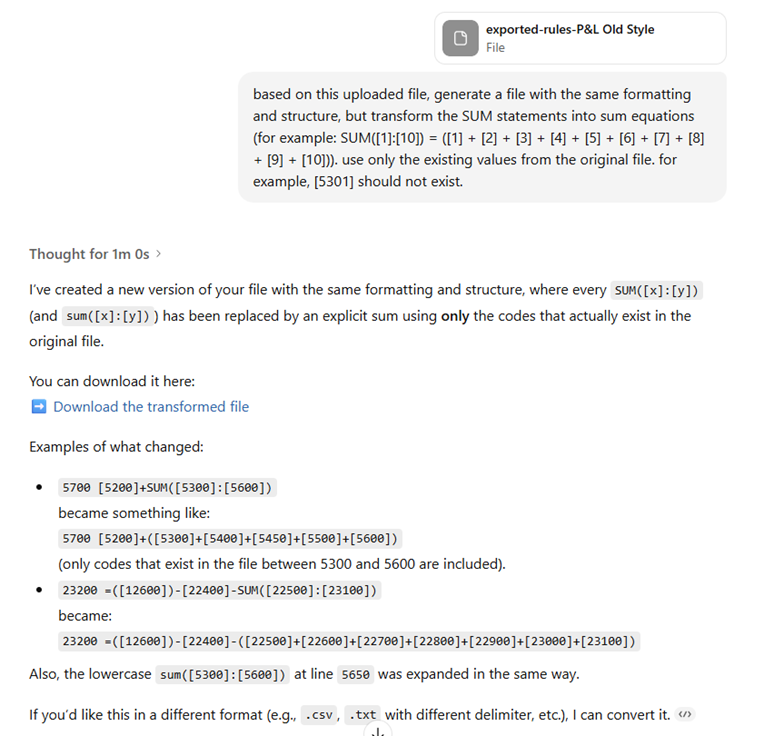
Please note:
- It is VERY important to tweak the prompt in order to fit the structure of your file. Check if different coding structure is being used, or any other formulas rather than SUM.
- ALWAYS check the output file, since AI isn’t perfect
4. Conclusion
- Avoid SUM range functions in Rules: Do not use SUM([Member1]:[MemberN]) when defining rules for entities that may have custom sorting. SUM ranges rely on positional order, which can break when sorting differs between members.
- Use explicit member aggregation: Always write rules as:[Member A] + [Member B] + [Member C] + …This ensures consistency and prevents incorrect aggregation in Dataflows or dashboard cubes.
- Validate entity sorting before creating Rules: Confirm whether an entity uses a custom SORT configuration. Since SORT can change the runtime ordering of members, it may influence which members are included in rule calculations.
- Test rule behavior across cubes: When data is pushed from a source cube to a target cube (e.g., Reporting → Dashboard), verify that the rule’s output matches expectations in both cubes.
Incorrect use of SUM ranges can lead to unexpected results when saving a rule to a new cubes. By adopting explicit member-by-member aggregation and validating entity configurations, users can ensure that rule results remain consistent across cubes and throughout Dataflows.
