
1. Abstract
This document describes the recommended approach for integrating Google BigQuery with Board using the Progress DataDirect JDBC connector within the Data Pipeline. It outlines the integration architecture, configuration steps, and data import methods, positioning BigQuery as the source of truth and Board as the analytics and planning layer. Key considerations include authentication via service accounts, performance optimization, security governance, and best practices for efficient data loading. The integration enables organizations to combine BigQuery’s scalability with Board’s modeling and reporting capabilities to create a robust, cloud-based analytics environment.
2. Context
As with many other integrations in Board, BigQuery is a widely used data warehouse platform that is lately increasingly being integrated with Board. While the integration process using the direct connector is relatively straightforward, it does present certain challenges.
For those approaching their first integration, it may raise several questions, so where should you begin your discussions with the customer when integrating with BigQuery?
A recommended integration approach is to use the Google BigQuery connection via the Progress DataDirect JDBC connector, which runs within the Data Pipeline. Please note that this is not a native Board connector, but a third-party connector provided by Progress.
The configuration process starts in the Data Pipeline, where the connection is set up. Next, you define the connection alias in the Cloud Admin portal. Once these steps are completed, you can create the Data Source in the Board System Administration portal.
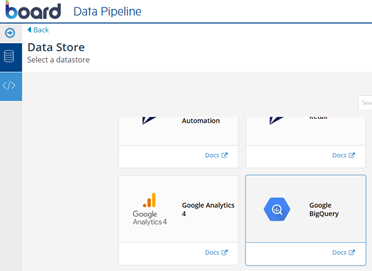
Using the Board BigQuery Connector, data can be imported efficiently into our Board data models, allowing users to analyse, plan, and report on large volumes of cloud-based data within a governed environment.
3. Content
3.1 Architecture Flow
The typical integration flow looks like this:
- BigQuery hosts datasets and tables in Google Cloud.
- Service account credentials are used by the Datapipeline JDBC driver to authenticate to BigQuery
- The Datapipeline executes queries against BigQuery. Datapipeline is the query execution layer.
- Data is loaded into Board entities and cubes via the SQL data readers
- Board users analyse and consume the data through Capsules, Screens, and Presentations.
This approach keeps BigQuery as the source of truth while Board serves as the analytics and planning layer.
3.2 Configuring the Connection
Before setting up the integration, ensure that the following prerequisites are in place: a Google Cloud project with BigQuery enabled, the appropriate permissions assigned, and access to the required datasets or tables to be queried.
3.2.1. A Service Account in Google Cloud needs to be created – This first step, in particular, must be completed by the customer’s administrator. Below are the guidance steps along with the mandatory files required for Board configuration:
- Generate a service account in the Google Cloud Console
- Assign the required BigQuery roles.
- Download the JSON key file, which will be used in Board for authentication.
3.2.2. Set Up the Data Source in Board Data pipeline
- In Board Data pipeline, create a new Data Source and select Google BigQuery as the connector type.
- Choose your authentication method (most common one is a Service Account)
- Upload the service account JSON key
- Specify the Project ID, Dataset and Location (if applicable)
- Test the connection to validate access
These fields are mandatory to establish connectivity. Once the connection has been validated and the data integration performance assessed, additional advanced settings can be configured to optimize performance further.
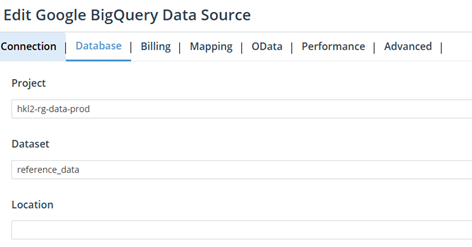
3.3 Importing Data into Board
Once the connection is established, data can be imported using Data Readers. You will be able to browse the configured metadata and view the available Projects and Datasets. It is therefore important to confirm with the customer which tables contain the data to be imported into Board.
BigQuery Terminology Mapping
In Google BigQuery, the terminology differs slightly from traditional relational databases:
- A Project is equivalent to a database.
- A Dataset corresponds to a schema.
- A Table remains the same.
Understanding this mapping helps avoid confusion when browsing metadata in the Data Pipeline and when writing SQL queries, especially since fully qualified schema references may not always be required or supported by the JDBC driver.
Supported Import Methods
- Table-based imports: Directly read from BigQuery tables.
- SQL-based imports: Use custom SQL queries for transformations, joins, or filtering.
Mapping to Board Structures
- BigQuery fields are mapped to:
- Entities (dimensions)
- Cubes (measures)
Data types should be carefully reviewed to ensure compatibility and optimal performance.
3.4 Considerations and Challenges
Performance
When integrating with BigQuery, consider the following best practices:
- Use SQL queries to pre-aggregate data where possible
- Limit the number of rows returned during imports
- Avoid SELECT *; explicitly define required fields
- Schedule imports during off-peak hours to reduce load
- Partition and cluster BigQuery tables to improve query performance
Security and Governance
- Authentication is handled securely via Google service accounts
- Board respects role-based security once data is loaded
- Sensitive data can be filtered or masked during the import process
- Access to BigQuery remains controlled by Google Cloud IAM policies
Challenges
- Large datasets leading to long load times
- Data type mismatches between BigQuery and Board
- SQL complexity affecting performance
- Cost implications from frequent BigQuery queries
Best Practices
- Request to have views into BigQuery which match the Board Data Model
- Optimize SQL and reduce data volume early
- Design Board data models aligned with BigQuery schemas
- Use incremental loads where possible
- Monitor query costs in Google Cloud
4. Conclusion
The Progress DataDirect BigQuery JDBC connector provides a powerful and scalable way to integrate cloud-native data with enterprise planning and analytics. By combining BigQuery’s performance and scalability with Board’s modeling, analysis, and presentation capabilities, organizations can create a robust, end-to-end analytics ecosystem.
