
1. Abstract
Managing a Weekly Fiscal Calendar presents a recurring challenge for organizations operating with 52- and 53-week Fiscal Years. The presence of an additional week disrupts like-for-like (LFL) comparisons, distorts year-over-year variance analysis, and complicates budgeting, forecasting, and reporting processes. This article outlines the key challenges associated with 53-week Fiscal Years and presents practical solutions within the Board platform. It evaluates standard configuration approaches and introduces a robust offset-cube methodology that enables accurate LFL reporting across Fiscal Years, including Week 53 scenarios. The proposed solution simplifies front-end reporting, maintains analytical consistency, and enhances governance over time-based financial comparisons.
2. Context
A Fiscal calendar is a period used to manage business activities, typically differing from the standard Gregorian calendar which has a standard 52 weeks, in a Fiscal calendar, some Fiscal years may contain 52 weeks, while others include an additional week (53 weeks). When comparing years containing 52 weeks to those with 53 weeks, several difficulties can arise in terms of managing financial records, reporting, and budgeting.
The discrepancy in the number of weeks between years can make like-for-like year comparisons more challenging. Reports or analysis may become distorted, as a year with 53 weeks will naturally have more time for sales, expenses, or any other financial activities compared to a 52-week year making it more difficult to assess performance.
To manage these difficulties, companies may need to adjust their financial planning, reporting systems, and accounting practices.
3. Content
In Board we have a variety of approaches that can be implemented, these may involve:
- Previous Year time setting based on Fiscal Year

By using the Previous Year Time Setting and setting the Calendar to the Fin Year, Board will match the week number of the Current year to the week number of the previous year. This solution allows for Like-for-like comparisons to previous years using Board functionality. Issues arise when a user is attempting to compare Fiscal Week 53 to the previous year, as there is no LFL comparison, Board will return Zero. This will distort any variance analysis shown in the report/dashboard.
- Hidden Data Blocks with -52 and -53 offsets based on an IF statement

This approach uses an algorithm IF statement to leverage which manual 52 or 53 week offset to present on the screen. Block B is a predefined cube flagging the Fiscal years that contain 53 weeks, the IF statement uses the flag to show either block c or d. In this example, if there is a 53-week Fiscal Year, the data view will show the 53-week offset to replicate the end of year comparison, therefore 202153 will compare against 202052 (replicating the last week of the previous year). The benefit of this approach allows for there to always be a comparator to the current year, regardless of whether the current Fiscal week selection is the 53rd week. However, there are a number of limitations:
- Multiple data blocks are required for this analysis
- Depending on how large the cubes are or how many variances need to be presented, there may be a significant impact on performance due to the number of cubes required to render.
- A flag cube is required to be maintained
- Fiscal week screen selections spanning multiple years will prevent the algorithm from deciding if the comparator value (53-week flag cube) is correct.
3.1 Proposed approach
Use dedicated cubes to store the offset values of the Reporting cubes. This can be achieved by creating an automated procedure to flow the correct Offset values into separate Offset Reporting cubes. The benefits of this approach allow the user to simplify the front end by replacing the manual offsets or algorithms with a single cube and retaining the ability to perform LFL comparisons without dropping data. The Offset cube will now contain the corresponding offset value regardless of whether the Fiscal Week screen selection spans multiple years, unrestricting the users reporting ability.
Consequently, there will be an increase in data usage as the process will be duplicating data which may have an impact on performance. Additionally, this procedure will need to be run as part of a weekly batch process to maintain the weekly offsets and may therefore increase time required (depending on how many reporting cubes require offsets) the weekly batch to complete.
The following are the steps required to build the proposed solution:
3.1.1 Step 1: Getting Started
To follow this example, the following Cubes, Data Readers, and Procedures will be required. This process has been developed on Board version 10 or higher.
Entity
Cubes
- FLOW-DATA Fiscal Year
- Datatype: Double
- Dimension: Fiscal Year
- FLOW-TEMP Count of Fiscal Weeks
- Datatype: Double
- Dimension: Fiscal Year
- CTRL-DATA No Week in Fiscal Year
- Datatype: Double
- Dimension: Fiscal Year
- FLOW-VIEW OFFSET <Reporting Cube>
- Datatype: Double
- Dimension: Fiscal Week, Plus a replica of Reporting Cube entities.
Procedure
3.1.2 Step 2: Procedure Logic
ADMIN OFFSET Calculation – Procedure Build
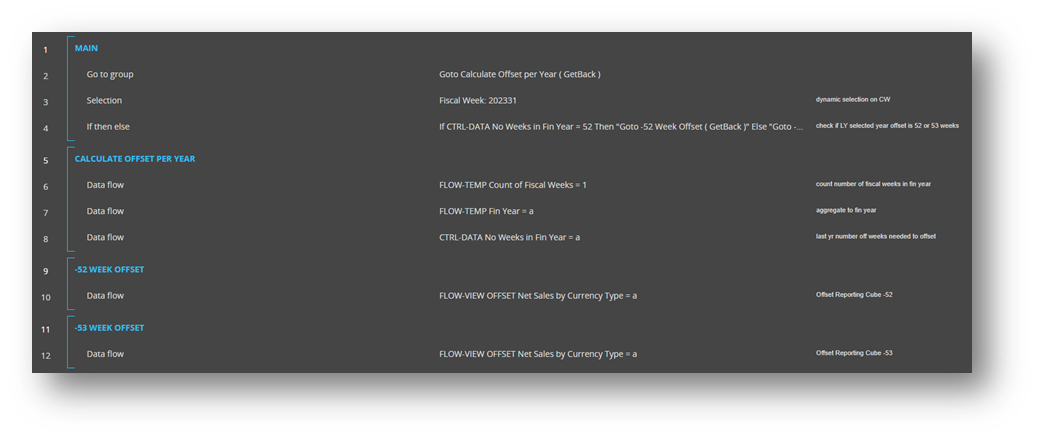
Go To Group: initial step is to calculate the number of weeks required to offset for each Year
6. Data flow: Set a value of one for every Fiscal week in each year. Note that no time selections have been placed.
7. Data flow: aggregate the Count of Fiscal Weeks cube to a cube structured by Fiscal Year to view each Fiscal Year's count of Fiscal Weeks.
8. Data flow: flow the previous year offset of the aggregated Fiscal Week count by Fiscal Year Forward by one year.
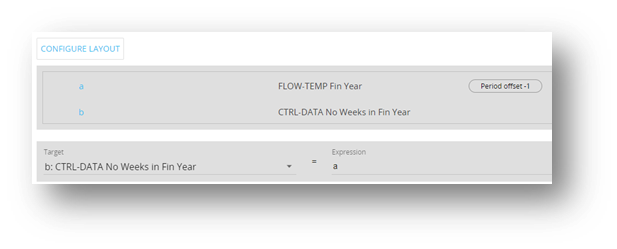
The logic needs to understand how many weeks offset are required per Fiscal Year e.g. as 2021 has 53 weeks, the mapping table below shows for Fiscal Year 2022, 53 weeks are required for a LY Offset.

Selection: define a time selection based on the reporting requirements. In this example, the sales data is only updated weekly, while the offset only requires a single week selection. This process can calculate historical weeks spanning across multiple years, on the condition that a single year is selected at a time (split the process into groups to iterate through each year).
If then else: Based on the No Weeks Offset in Fiscal Year cube, go to Group -52 Weeks Offset group if equals to 52, else go to group -53 Week Offset. This is determined by the Time selection in Step 3.
-52 Week Offset
10. Data flow: Perform a time offset of -52 weeks from source Reporting cube to Target Offset cube.
-53 Week Offset
10. Data flow: Perform a time offset of -53 weeks from source Reporting cube to Target Offset cube.
Result:

Replicating the example used in the previously suggested Potential Board solutions, The Target Offset cube will now reference the previous year sales for 202153. This solution will only require a reference to the target cube, dropping the complications of manually setting the Time offset settings.
4. Conclusion
The intricacies of handling an additional week in a Fiscal year necessitate a thoughtful and adaptive approach. As businesses grapple with the implications of a 53-week year, it becomes evident that standard Fiscal practices may require modification to accommodate this irregularity. The potential for discrepancies in year-over-year comparisons and the need for recalibration reporting calls for planning that goes beyond the routine considerations of a standard 52-week cycle.
In navigating these challenges, Board developers must be able to analyse each solution and decide which is best fit for purpose and which provides the most benefits per scenario. While the additional week introduces a layer of complexity, it also serves as a reminder of the dynamic nature that the Board platform allows us to implement solutions.
