Best Of
e-Learning Board exercises
Dear all,
regarding the question Exercises available?,
I would like to give you some insights of what you can expect from the new exercises tutorial, that will be available soon!
The step by step tutorial will be structured as a business scenario, with different exercises to be solved in sequence.
The aim of this new tutorial will be to understand how Board works in a very practical way, strengthening the link between technical and business context.
The exercises will be structured with an increasing level of difficulty, and will be linked together. The next exercise could be approached only once the former one has been completed.
Each exercise will be provided with a specific learning path, helping the trainee to catch all the needed knowledge before approaching the exercises.
If you have any question about e-Learning please let me know, I'll be glad to give you more information!
Kind regards,
Stefano
 Unknown
E-learning catalog - Part one: Database Modelling
This course is for database administrators who would like to be self-sufficient in using BOARD to project, implement and maintain databases.
The learner will understand the fundamental mechanisms of database construction, dealing with error troubleshooting, security profile management and the operations needed to implement all aspects of the database including entities, relationships and cubes.
This will then be put into practice on a small data set to create a sales analysis application managing multiple data sources.
Videos part of this course:
- E-learning tutorial: The database creation and time range (DB01)
- E-learning tutorial: The entity (DB02)
- E-learning tutorial: Entity and Relationship Model (DB03)
- E-learning tutorial: Info-cubes (DB04)
- E-learning tutorial: The Data reader (DB05)
- E-learning tutorial: The Dual Engine and near real-time reporting (DB06)
- E-learning tutorial: The Rules (DB07)
This course is designed for Developers.
Unknown
E-learning catalog - Part two: capsule design
This course is designed for advanced users who would like to proactively develop analyses and applications within BOARD.
The course introduces the methodological approach of the Toolkit which allows user to easily prepare their own applications through the parameterization and assembly of objects. It also covers the definition of the Capsule as a workspace and container for objects.
The course shows and describes the features useful for the creation of BOARD applications, notions of parameterization and the relationships among them, including data-entry definitions and predisposition of simulation and budgeting environments (BOARD as CPM Tool).
- E-learning tutorial: Working with Capsules (XP01)
- E-learning tutorial: Working with Screens (XP02)
- E-learning tutorial: How to do a report: THE DATAVIEW (XP03)
- E-learning tutorial: How to apply the Time Functions (XP04)
- E-learning tutorial: The Report Format Layers (XP05)
- E-learning tutorial: Buttons and Labels (XP06)
- E-learning tutorial: Select Facilities (XP07)
- E-learning tutorial: The Chart Story (XP08)
- E-learning tutorial: The Data Entry (XP09)
- E-learning tutorial: The Item Entry (XP10)
- E-learning tutorial: The Cockpits (XP11)
- E-learning tutorial: The Containers (XP12)
- E-learning tutorial: report Automation and Broadcasting (XP13)
- E-learning tutorial: The NEXEL (XP14)
This course is designed for Developers.
Unknown
Troubleshooting - BOARD Client in Auto Update
In this article we will discuss about some issues related to the Auto Update for the Board Windows (FAT) Client, used until Board 10.x.
The Auto-Update is that feature aligning the BOARD Client to the same version as the BOARD Server without the need of installing again the BOARD Client.
Please remember that from Board 10.7 Board strongly recommend to use the Board WEB Client, through an updated browser.
PROBLEM
When you launch the BOARD Client and authorized the aligning to the Board Server release, you might get two different behaviors:
- Download Problem: the download bar disappears without messages and the BOARD Client does not open (you might get a Windows error)
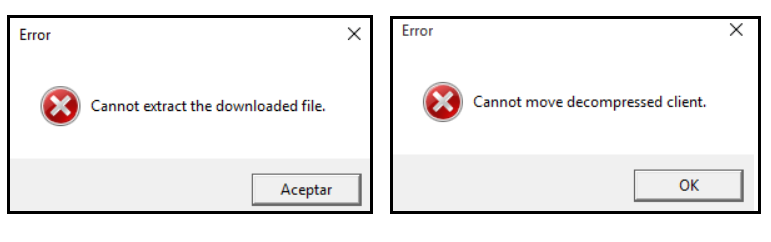
- Extraction Problem: You get one of the following error messages “Cannot move decompressed client” or “Cannot extract the downloaded file”.
SOLUTION
Download Problem
In such a case, the AutoUpdate fails because of two potential reasons:
The AutoUpdate feature is not enabled on the BOARD Server

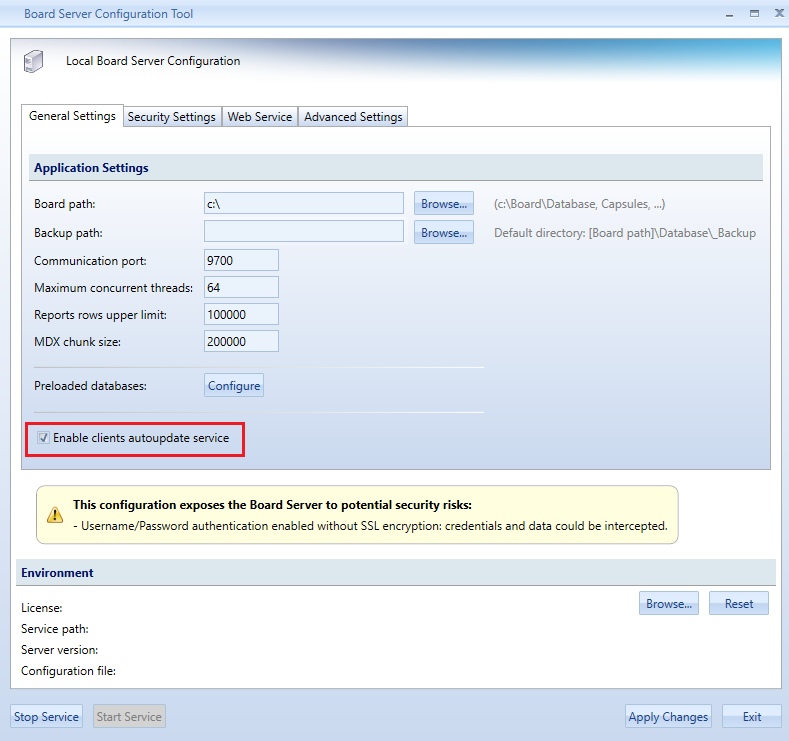
- Port 9710 is not open: this port is used to distribute the Client from the BOARD Server to the client machines: Board Server configuration
Extraction Problem
In this case, many reasons could cause the AutoUpdater to fail. At first, you need to verify all the points below:
- Browse to "%AppData%\Board International\Board 7.0": make sure your Windows user and the Administrator have full rights on that folder
- Make sure that Windows Explorer is the default app used to open *.zip files
- Disable your virus scanner or make sure that is it is not blocking the BOARD update process
Then, follow these steps:
- Delete all *.zip files in the folder "%AppData%\Board International\Board 7.0\Autoupdate2" and any tempVersion folder in "%AppData%\Board International\Board 7.0\Autoupdate2\Clients"
- Start the BOARD Client again as Administrator and try the AutoUpdate process

Troubleshooting: Garbage Collector is not running in Server mode
Symptom:
At the end of BOARD Server installation on Windows Server, the service doesn’t start properly.
From Windows Event Viewer, the following error is tracked:

Error Tracker
BOARD Server is starting
Configuration: C:\Program Files\Board\Board Server\server_config_v2.xml
Cannot start BOARD Server. Original cause: The .NET Framework Garbage Collector is not running in Server mode. Configuration file created. Please restart the process.
Stack trace:
at BoardUtilities.Utils.CheckGCServerMode()
at BoardService.Initializer.InitializeBoardEngine()
at BoardMaster.BoardWinServiceHostManager.Start(Boolean isMaster, Type type)
---------------------------------------------------------------------------------------------------------
Solution
This error prompts when your BOARD Server is running on a single-core Machine.
Execution of BOARD Server on single-core Machines is not supported from version 8.x or later