Best Of
Troubleshooting - BOARD Client in Auto Update
In this article we will discuss about some issues related to the Auto Update for the Board Windows (FAT) Client, used until Board 10.x.
The Auto-Update is that feature aligning the BOARD Client to the same version as the BOARD Server without the need of installing again the BOARD Client.
Please remember that from Board 10.7 Board strongly recommend to use the Board WEB Client, through an updated browser.
PROBLEM
When you launch the BOARD Client and authorized the aligning to the Board Server release, you might get two different behaviors:
- Download Problem: the download bar disappears without messages and the BOARD Client does not open (you might get a Windows error)
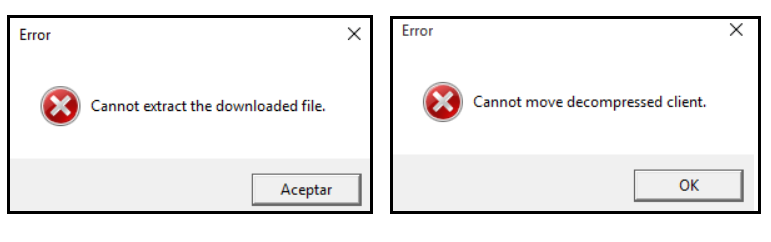
- Extraction Problem: You get one of the following error messages “Cannot move decompressed client” or “Cannot extract the downloaded file”.
SOLUTION
Download Problem
In such a case, the AutoUpdate fails because of two potential reasons:
The AutoUpdate feature is not enabled on the BOARD Server

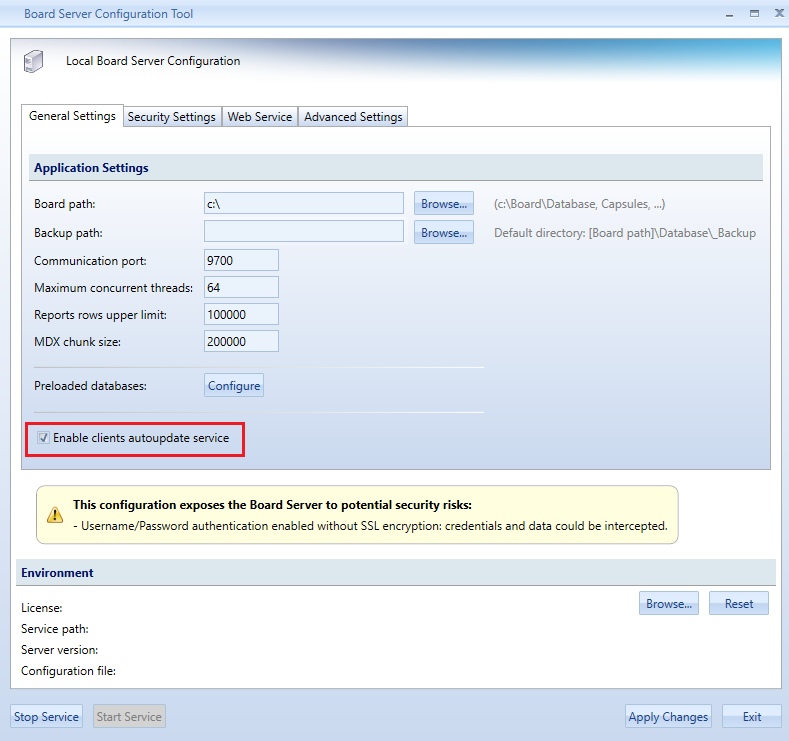
- Port 9710 is not open: this port is used to distribute the Client from the BOARD Server to the client machines: Board Server configuration
Extraction Problem
In this case, many reasons could cause the AutoUpdater to fail. At first, you need to verify all the points below:
- Browse to "%AppData%\Board International\Board 7.0": make sure your Windows user and the Administrator have full rights on that folder
- Make sure that Windows Explorer is the default app used to open *.zip files
- Disable your virus scanner or make sure that is it is not blocking the BOARD update process
Then, follow these steps:
- Delete all *.zip files in the folder "%AppData%\Board International\Board 7.0\Autoupdate2" and any tempVersion folder in "%AppData%\Board International\Board 7.0\Autoupdate2\Clients"
- Start the BOARD Client again as Administrator and try the AutoUpdate process

Troubleshooting: Garbage Collector is not running in Server mode
Symptom:
At the end of BOARD Server installation on Windows Server, the service doesn’t start properly.
From Windows Event Viewer, the following error is tracked:

Error Tracker
BOARD Server is starting
Configuration: C:\Program Files\Board\Board Server\server_config_v2.xml
Cannot start BOARD Server. Original cause: The .NET Framework Garbage Collector is not running in Server mode. Configuration file created. Please restart the process.
Stack trace:
at BoardUtilities.Utils.CheckGCServerMode()
at BoardService.Initializer.InitializeBoardEngine()
at BoardMaster.BoardWinServiceHostManager.Start(Boolean isMaster, Type type)
---------------------------------------------------------------------------------------------------------
Solution
This error prompts when your BOARD Server is running on a single-core Machine.
Execution of BOARD Server on single-core Machines is not supported from version 8.x or later
Patch release for the Windows Client Version 10.6
A new patch version for the Windows Client Version 10.6 has been released.
The updated version contains two fixes:
- a fix regarding the GeoMap object. The GeoMap is not supported anymore in the previous versions of the Windows Client. All the previous versions do not support this object anymore.The GeoMap is still supported on the web application, also in versions prior to 10.6.
- a fix regarding the corporate identity designer which was not working correctly on version 10.6.
To install the updated windows client on your laptop you need to follow the following steps:
Standard installation: just uninstall the previous version of the Windows Client and install the new one.
Auto-update installation: the auto-update version retrieves the updates directly from the server. For this reason the update needs to be placed on the server and it will be available for all the client users. The version can be updated on the Server by just downloading THIS package ( AutoUpdaterFiles.zip ) and replacing the existing one inside the AutoUpdaterFiles folder on the BOARD Engine installation path (the default path is C:\Program Files\Board\Board Server).
This operation does not require any restart of the Board services.
Click herefor the full list of changes and fixes.